
Confused by all the new AI coding tools? Here is a simple breakdown
If you feel like a new AI tool launches every week, you aren't alone. I’ve been looking at the big players—GitHub Copilot, Cursor, Claude Code, and Google AI Studio—to see which one actually wins.
Here is the "too long; didn't read" version:
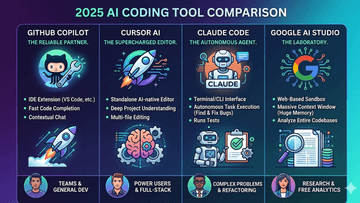
GitHub Copilot (The Reliable Partner) It’s an extension for VS Code. It’s fast, simple, and great for finishing your sentences. Best for: Teams who want a solid tool that just works.
Cursor (The Supercharged Editor) It’s not an extension; it’s a full code editor that looks like VS Code but has "brains" built into every corner. It understands your whole project, not just one file. Best for: Developers who want the AI to handle bigger, multi-file changes.
Claude Code (The Autonomous Agent) This one lives in your terminal (CLI). You tell it what to do, and it goes to work—searching files, running tests, and fixing bugs on its own. Best for: Solving complex problems or big refactors while you watch.
Google AI Studio (The Laboratory) This is a web tool, not an editor. It has a massive "memory" (context window), so you can drop an entire codebase into it to ask questions or find bugs for free. Best for: Researching and testing ideas before you write the code.
The Bottom Line:
Want it simple? Go Copilot.
Want a smarter editor? Try Cursor.
Need an agent to do the heavy lifting? Use Claude Code.
Need to analyze huge amounts of data for free? Open AI Studio.
Which one are you using in your workflow right now? Let’s chat in the comments! ????
#SoftwareDevelopment #AI #Coding #ProgrammingTips #GitHubCopilot #CursorAI #Claude